Decode Your VIN
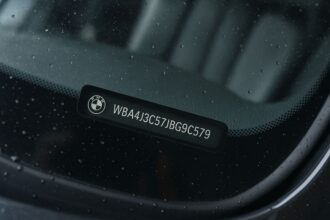
Enter your vehicle's VIN code to discover all technical specifications. The VIN consists of 17 alphanumeric characters.
By Mark Tyler. Published 31 October 2026. Prices and limits checked on that date; they change, so confirm at checkout.
A VIN decoder tells you what a car was when it left the factory. A VIN lookup or history report tells you what happened to it afterwards. Most people searching for a “VIN decoder” need one, the other, or both, and the best tools are different for each job.
This guide reviews 11 VIN decoder and VIN lookup tools: what each one shows, what it costs, and where it falls short. Four are free, four charge for reports, and three mix a free check with paid extras.
One disclosure before the list: we run VinDecoderPlus, and it is number one here. We explain why below, and we say plainly what it can’t do. Where a competitor beats us at something, we say that too.
The 11 tools at a glance
| Tool | Best for | Cost | Type |
|---|---|---|---|
| 1. VinDecoderPlus | Understanding what each VIN code means | Free | Decoder + recalls |
| 2. NHTSA vPIC decoder | Official factory data for US-market vehicles | Free | Decoder |
| 3. NHTSA recall lookup | Open safety recalls | Free | Lookup |
| 4. NICB VINCheck | Stolen and total-loss checks | Free | Lookup |
| 5. VinAudit | Cheap NMVTIS history report | $9.99 per report | History report |
| 6. EpicVIN | Salvage-auction photos and listing history | Free check, paid report | History report |
| 7. Carfax | Service records on US cars | Paid per report | History report |
| 8. AutoCheck | Comparing several cars with a score | Paid; bundles | History report |
| 9. carVertical | Imports and cars with European history | Paid per report | History report |
| 10. Vincario | Developers who need a VIN API | Limited free use, then paid | Decoder + API |
| 11. VinDecoderz | A quick free decode, with caution | Freemium | Decoder + reports |
Decoder, lookup or history report: which do you need?
The three terms get mixed up constantly, and the mix-up costs people money.
- A decoder reads the 17 characters and reports what the manufacturer built: make, model year, engine, plant. It cannot know about accidents, because the VIN doesn’t record them.
- A lookup checks the VIN against one database, such as open recalls or insurer theft records.
- A history report pulls many databases together: title brands, odometer readings, past sales and sometimes service records. This is the only type that can warn you about a rebuilt wreck.
If you are buying a used car, you will probably use all three. We cover that workflow near the end. For the difference in more detail, see our guide to VIN decoders versus vehicle history reports.
How we chose and ranked these tools
We build VIN decoder pages for individual models and check each one against real VINs decoded through NHTSA’s vPIC database. That work shows us where decoders agree, where they guess, and where they say nothing. We judged each tool on five questions:
- What data does it show, and where does that data come from?
- What does it cost, and is the price clear before you enter a VIN?
- Does it say what it can’t tell you?
- Does it work without an account?
- Would we send a friend to it?
We did not run every tool against the same set of test VINs, and no tool on this list paid to be included. Facts come from each tool’s own pages and from NHTSA and NICB, linked at the end. If you spot something out of date, tell us and we will fix it.
1. VinDecoderPlus: best free decoder for learning what the codes mean
Best for: anyone who wants to decode a VIN and understand it. Cost: free, no account.
VinDecoderPlus is our site, so weigh this entry accordingly. It decodes a 17-character VIN using NHTSA’s public vPIC database and shows the make, model year, engine, assembly plant and open recalls. You don’t create an account or leave an email address.
Where we think it earns the top spot is the explaining. Most decoders print a table of values and stop. We also have pages for individual models, including BMW, Toyota, Ford, Honda and Tesla, that show which VIN characters carry the engine, the year and the plant for that model, with examples checked against real VINs. If you want to know why position 10 says “L” on a particular car, that is the page for it. The basics are in our guide to reading a VIN number, and our page on the check digit shows how to spot a mistyped or altered VIN.
What we like:
- Free and fast, with no signup.
- Model-level pages that explain the codes instead of just listing them.
- Open recalls from NHTSA data alongside the decode.
What to know before you use it:
- It is a decoder, not a history report. It cannot tell you about accidents, title brands or odometer rollbacks.
- It relies on NHTSA data, so coverage is strongest for vehicles sold in the US market.
- The site also links to an optional paid full report from a third-party provider. The free decoder doesn’t require it.
Decode a VIN on VinDecoderPlus
2. NHTSA vPIC VIN decoder: the official source
Best for: authoritative factory data. Cost: free.
vPIC is the US government’s own VIN decoder, run by the National Highway Traffic Safety Administration. Several other decoders, ours included, build on it, so it is worth knowing what it does by itself. You enter a VIN, or part of one, and it returns the decoded details plus the build plant and country. If you enter a model year, it overrides the year encoded in the VIN, which is handy for checking ambiguous cases.
Its data is reported by manufacturers, so it is only as good as what they submit, and NHTSA tells you to contact the manufacturer if something looks wrong. It cannot decode model years before 1981. The interface is plain and the output is dense, which is the main reason other tools exist.
Pick it when you want the source rather than someone’s summary.
3. NHTSA recall lookup: the one check everyone should run
Best for: open safety recalls. Cost: free.
NHTSA’s recall tool takes a VIN or license plate and lists unrepaired recalls for at least the past 15 calendar years. It covers major automakers, motorcycle makers and some medium and heavy truck makers. It takes seconds, and a recall that was never fixed is a real safety risk and a bargaining point when you buy.
Read a clean result carefully. “0 unrepaired recalls” does not mean the car never had a recall; it means none is open. Recalls older than 15 years may not show, and recalls carried out outside the US may be missing. For model-specific context, see our page on checking recalls by VIN.
4. NICB VINCheck: free theft and total-loss check
Best for: ruling out a stolen or insurer-declared total loss. Cost: free, five searches per IP address per 24 hours.
The National Insurance Crime Bureau runs this one. It compares your VIN against records supplied by member insurers and tells you whether the vehicle has an unrecovered theft record or a salvage or total-loss record. NICB says its members represent 92.49% of earned US insurance premium.
The limits matter. Only insurance records appear, and only from participating insurers, so a total loss that never went through an insurer may not show. It does not cover accident history, title brands or odometer readings. The five-searches-a-day cap is per IP address, which can bite if you are shopping from a shared network. Pair it with a history report before you hand over money. Our guide to checking if a car is stolen by VIN explains the other places to look.
5. VinAudit: the cheapest paid history report
Best for: a low-cost report with government title data. Cost: $9.99 for one report, $19.99 for five, $29.99 for ten.
VinAudit is an approved NMVTIS data provider. NMVTIS is the US Department of Justice’s national title database, fed by state motor vehicle agencies, insurers and salvage yards. VinAudit’s report covers title history, theft checks, salvage records, past sale listings and open liens. It also offers a free summary report, a free decoder, a free market-value check and a five-year ownership-cost estimate, so you can see something before paying.
NMVTIS data is useful but not complete. It will catch title brands such as salvage or rebuilt, which is the most expensive thing to miss. VinAudit doesn’t advertise the detailed service records that some pricier reports collect. For many buyers, a $9.99 report plus a mechanic’s inspection is a sensible, cheap combination.
6. EpicVIN: free check first, with a subscription catch
Best for: salvage-auction photos and past listings. Cost: free check; full report is paid.
EpicVIN runs a free VIN check across what it says are 70 databases and returns specs, open recalls, odometer status and counts of accidents, sales and owners. It also offers a free check by license plate. The full report adds every odometer reading with its date, salvage-auction photos and damage estimates, past sale listings with prices, owners by state, title records and liens. EpicVIN is an approved NMVTIS provider, and its theft records come from NICB.
Read the price before you click. The homepage says “Starting from $1*”, and the asterisk says that price requires a trial subscription to its Unlimited Vehicle History Reports package. The site doesn’t state the full subscription price on that page, so check it and note the cancellation terms before you enter a card. The salvage photos are the real draw. Seeing the damage often tells you more than a line of text.
7. Carfax: the name everyone knows
Best for: service and maintenance history on US cars. Cost: paid per report; check the current price.
Carfax is the brand most US dealers and buyers recognize, and many dealers include a report on their listings, which is the easiest way to read one for free. Its edge has been service and maintenance records collected from shops, plus accident reports and title information.
The downsides are price and coverage gaps. Historically it has cost more than AutoCheck and than NMVTIS-based reports, and no report catches an accident that nobody reported. If a dealer hands you a Carfax, read it, then run an independent check anyway. A clean report isn’t the same as a clean car.
8. AutoCheck: the score that helps you compare
Best for: shopping several cars at once. Cost: paid per report, with multi-report bundles; check the current price.
AutoCheck, owned by Experian, gives each vehicle a score from 1 to 100. The score compares the car with similar used vehicles and weighs factors such as age, number of owners and whether the car meets AutoCheck Assured standards, meaning no major issues such as title brands or odometer problems. When you are choosing between four similar sedans, a single number helps you narrow the field fast.
Bundles make it cheaper per car if you are comparing several, though you should confirm the current bundle price and its expiry window on the site. Like every history report, it only knows what was reported to it.
9. carVertical: stronger on imports and European cars
Best for: vehicles that lived outside the US. Cost: paid per report; prices differ by country.
carVertical says its reports draw on over 900 sources, including state registries, law enforcement agencies and service records. Sections can include accident and damage history, ownership history, a title check, specs and equipment, an estimated market price, and recall information. Not every section appears in every report; it depends on what data exists for that vehicle.
The company is better known in Europe, and the prices we found were in euros for European markets, so check the US price on its site. That makes it most useful for imports, European brands and cars that crossed a border, where a US-only report may have a blind spot.
10. Vincario: for developers and fleets
Best for: apps and businesses that need VIN data through an API. Cost: limited free use, then paid.
Vincario is a VIN decoding and vehicle data platform aimed at businesses. Its REST API handles decoding and offers market-value and stolen-vehicle checks. New users get a small number of free lookups to test it, and then pricing is subscription or per-lookup. Details vary between its own pages and third-party listings, so check its pricing page before you build anything on it.
If you only want to decode one VIN for yourself, this is more than you need. If you are building a dealership tool or a parts catalogue, it is worth a look.
11. VinDecoderz: a free decode, read the billing terms
Best for: a quick check, if you are careful. Cost: freemium.
VinDecoderz describes itself as a decoder for vehicles built since 1981, and says its free report, which it says is funded by advertisers, lists specs, equipment, recalls and more. It has been listed on AlternativeTo since 2017, where it is categorized as freemium. Full reports are sold separately.
Independent feedback is thin. Its Trustpilot page shows only one review, and we found a complaint on a consumer-review site about a monthly fee charged after a lookup. A handful of reviews can’t tell you much either way, but they are a reason to read the terms and to skip entering card details unless you know exactly what you are buying.
How to use these tools together when buying a used car
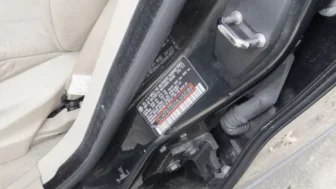
- Decode the VIN with VinDecoderPlus or NHTSA vPIC. Check that the model year, engine and plant match the listing. A mismatch is a red flag. Find the VIN in more than one place on the car, see where the VIN is located, and confirm the stamps agree.
- Run the free lookups: NHTSA recalls and NICB VINCheck. They take two minutes and cost nothing.
- Buy one history report. VinAudit is the cheapest start. If you are comparing several cars, AutoCheck bundles can work out cheaper. If a dealer provides a Carfax, read it, then verify elsewhere.
- Get an independent inspection. No database sees a bent frame or a leaking gasket. For specific risks, read our guides on salvage titles, flood damage and odometer rollback.
Frequently asked questions
What is the best free VIN decoder?
For the official data, NHTSA’s vPIC. For a decoder that also explains the codes and shows recalls, VinDecoderPlus, which is ours. All free decoders only report factory data. None can show accident history.
Can a VIN decoder show accident history?
No. A VIN contains build information, not events. Accident and title history come from history reports that draw on insurers, state agencies and shops, and even those only know about reported events.
Is a free VIN check enough before buying a used car?
Free checks are a good first filter. NHTSA recalls and NICB VINCheck can rule out open recalls and some thefts and total losses. For a purchase of thousands of dollars, add at least one paid history report and a mechanic’s inspection.
Are all VIN history reports the same?
No. They draw on different data. NMVTIS-based reports focus on title, salvage and odometer records. Others add service records, auction photos or listings. Running two different providers can catch things one misses.
Does a VIN decoder work on cars from outside the US?
Partly. The 17-character format is an international standard, but many decoders, including NHTSA’s, are strongest for US-market vehicles. For imports, a tool with European data such as carVertical may add more.
Sources
- NHTSA vPIC VIN decoder
- NHTSA recall look-up
- NICB VINCheck
- VinAudit
- EpicVIN
- carVertical: what a report may include
- Vincario
- VinDecoderz on AlternativeTo
About the author. Mark Tyler runs VinDecoderPlus. He builds the site’s model pages and checks them against NHTSA vPIC data and real VINs. This guide was written and edited by the VinDecoderPlus team.
Decode a VIN by make and model
Pick your make to see the VIN codes, plants and engines for each model: Toyota, Honda, Ford, Chevrolet, BMW, Mercedes-Benz, Tesla, Nissan, Hyundai, Kia, Volkswagen, Audi, Jeep, Subaru, Lexus, Acura, or browse all makes.
Popular model pages: Toyota Camry VIN decoder, Toyota RAV4 VIN decoder, Honda Civic VIN decoder, Honda CR-V VIN decoder, Ford F-150 VIN decoder, Chevrolet Silverado VIN decoder, Tesla Model 3 VIN decoder, Jeep Wrangler VIN decoder, BMW X5 VIN decoder, BMW X7 VIN decoder, BMW i4 VIN decoder, BMW M4 VIN decoder.